-
Shop
- Adidas
- AI Career Advantage Collection
- AI Skills for Creators & Freelancers
- AI Client Management
- AI Ethics
- AI Mindset
- AI Tools & Prompts
- AI Writing & Content Creation
- Audio, Voice & Music
- Design & Visual Creation
- Email, Messaging & Communication
- Freelancing & Business
- Marketing, Ads & Conversion
- Productivity, Workflow & Automation
- SEO & Search Optimization
- Social Media Content & Growth
- Strategy, Planning & Analytics
- Video Creation & Editing
- AI Skills Mastery 2026 Collection
- Apple Accessories
- Best-Sellers
- Business & Digital Skills
- Car Accessories
- Confidence
- Dating & Social Skills
- Digital Resources
- AI & Technology
- Beauty
- Budgeting & Saving
- Car Buying & Ownership
- Entrepreneurship & Business Growth
- Financial Education
- Financial Independence
- Financial Mindset & Psychology
- Goal Setting
- Hobbies
- Home Styling & Organization
- Kitchen & Recipes
- Leadership
- Mindfulness
- Online Business
- Parenting & Child Development
- Personal Style & Fashion
- Pet Lifestyle & Wellness
- Positive Thinking
- Sleep Improvement
- Smart Life with AI
- Stress Management & Relaxation
- Wellness
- Yoga & Mind-Body Practices
- Education & Learning
- Family & Home
- Family & Parenting
- Fashion
- Fashion & Beauty
- Fashion Accessories
- Furniture
- Gadgets
- Health & Beauty
- Health & Wellness
- Home & Garden
- Home Supplies
- Jewelry
- Kids & Babies
- Nike
- Personal Growth
- Personal Growth & Wellness
- Pet Care
- Pet Supplies
- Pets
- Sport & Outdoors
- Super Deals
- Travel
- Travel & Adventure
- Wealth
- Wealth Building
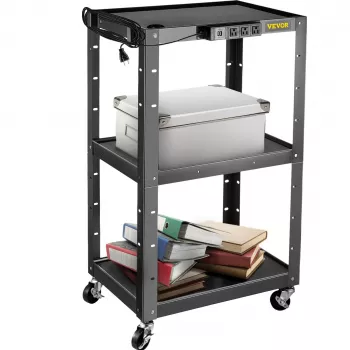
Height-Adjustable AV Cart: Built-In Power & Cable Control
Height Adjustable AV Cart with Power Strip & Cord Management
A height-adjustable AV cart keeps screens, laptops, and presentation gear stable, mobile, and easy to connect—without the tangle of loose cords. Whether it’s rolling between classrooms or setting up a quick training station in a conference room, the right cart helps equipment stay organized, powered, and safer to use. The biggest gains come from two built-in advantages: an onboard power strip that reduces outlet hunting, and cord management that keeps cables close to the frame so nothing drags, snags, or becomes a trip hazard.
What a height-adjustable AV cart is used for
A height-adjustable AV cart is a mobile platform designed to carry and power common presentation and media equipment while letting you raise or lower the working surface to match the room and audience. Typical uses include:
- Mobile workstation for projectors, monitors, laptops, document cameras, and small mixers
- Everyday setups in classrooms, training rooms, conference spaces, libraries, and clinics
- Better sightlines with adjustable height for seated audiences, standing presenters, and hybrid layouts
- Faster roll-in setup with integrated power and cable routing that reduces loose-cord clutter
When a cart’s height can change, it becomes easier to align a webcam or document camera, set a laptop at a comfortable typing level, or position a monitor so it’s readable from the back of the room.
Key features that matter most
Not all carts feel the same in daily use. The most practical differences show up when you load gear, move through doorways, and run cables for the hundredth time.
- Height adjustment range: Look for enough travel to position the top shelf for comfortable viewing and input without wrist strain or shoulder hunching.
- Stable frame and shelves: Rigid columns, reinforced shelf supports, and anti-wobble construction help prevent screen shake while typing or tapping a touchscreen.
- Integrated power strip: Simplifies plugging in a laptop, display, streaming device, or speakers using one main outlet connection.
- Cord management path: Channels, clips, or wraps keep cables close to the frame during movement so they don’t catch on chair legs or door hardware.
- Locking casters: At least two locking wheels prevent drift during use; larger wheels generally roll better over thresholds and carpet transitions.
- Shelf layout: Put active controls on the top shelf (laptop), heavier equipment lower (CPU, amplifier) to keep the center of gravity down.
If the cart will support a monitor or larger display, stability is the deciding factor. A smooth height adjustment mechanism is helpful, but a rigid frame and solid caster base are what keep the setup calm and predictable during a presentation.
Power strip and cord management: how to keep setups clean and safe
A built-in power strip is only as useful as the cable routing around it. The goal is a layout that survives rolling between rooms without yanking plugs, dragging cords into wheels, or creating a loop that someone can trip over.
- Route cables along the cart frame, not across open walkways—leave slack only where height changes require it.
- Bundle by function: group power cords together and signal cables (HDMI/USB/audio) together to reduce snags when rolling.
- Keep adapters and power bricks off the floor by placing them on a shelf or securing them with ties to reduce stress on plugs.
- Position the main cart power cord so it exits from the rear and drops straight down to the outlet to avoid wheel contact.
- Label both ends of commonly swapped cables (HDMI, USB-C, audio) for faster troubleshooting during time-sensitive setups.
- Avoid overloading: add up device wattage/amps and stay within the power strip rating; use grounded outlets when required.
For additional safety guidance on electrical equipment and cord practices, consult resources from OSHA, the NFPA, and UL Solutions.
Cable routing checklist
| Task | Why it helps | Quick tip |
|---|---|---|
| Secure cables to the frame | Prevents snagging while rolling | Use reusable hook-and-loop ties every 8–12 inches |
| Separate power and signal runs | Reduces interference and tangles | Route power on one side, HDMI/USB on the other |
| Leave a service loop near moving parts | Allows height changes without pulling plugs | Add a gentle 3–5 inch loop before clips |
| Keep the main power cord clear of wheels | Reduces damage and trip risk | Guide the cord downward behind the rear caster line |
| Label connection points | Speeds up setup and teardown | Use small tags: “Laptop HDMI,” “Display,” “Audio Out” |
How to Choose a Height-Adjustable AV Cart for your room and workload
The best cart is the one that fits the building, supports the real gear you use, and stays steady when someone bumps the table mid-demo.
Setup and placement for stable presentations
Maintenance and longevity tips
FAQ
How much weight can a height-adjustable AV cart safely hold?
Capacity depends on the specific model, including the total rated load and any per-shelf ratings. Keep heavier equipment on the lowest shelf, distribute weight evenly, and avoid off-center loads that raise the center of gravity and increase tipping risk.
Can the built-in power strip be used as a surge protector?
Some built-in strips include surge protection, while others provide basic power only. Check for a surge rating (often listed in joules) and an indicator light; if it isn’t surge-rated and you’re using sensitive electronics, use a dedicated surge protector that matches your equipment needs.
What’s the best way to manage cables when the cart height changes?
Leave a small service loop near the height-adjustment area, secure cables to the frame with reusable ties, and route power and signal separately. After raising or lowering, re-check slack so nothing is pulling on connectors or hanging near wheels.
Recommended for you

Was this article helpful?
Yes
No








Leave a comment