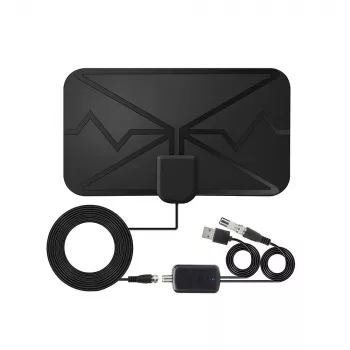
Cut monthly TV costs while keeping local channels clear. A long-range indoor antenna with an amplifier can help pull in over-the-air broadcasts in HD and, where available, 4K—especially when placement and setup are done correctly. The key is understanding what the antenna can (and can’t) do, then taking a few minutes to test placement, scan for channels, and fine-tune amplification.
A digital TV antenna is built to capture free broadcast signals from nearby TV towers and send them to your TV’s tuner through coax cable.
If you’re not sure where transmitters are in your area, the FCC DTV Reception Maps and AntennaWeb can help you estimate tower direction and expected coverage before you start moving the antenna around.
“300 miles” range claims are best thought of as a marketing maximum under ideal conditions. Real homes introduce walls, wiring, electronics noise, and reflections that can shrink effective range.
| Factor | What You Might Notice | Best Fix |
|---|---|---|
| Distance to towers | Fewer channels, intermittent audio/video | Mount higher, face window side, use amplifier if needed |
| Walls/foil insulation/metal screens | Pixelation or missing major networks | Move to a window, avoid metal obstacles, try another wall |
| Multipath (reflections in cities) | Signal bars look strong but picture breaks up | Shift antenna a few feet, change angle, avoid corners |
| Electrical interference | Dropouts when appliances run | Keep away from routers, microwaves, power strips; shorten cable |
Placement is where most “extra channels” are found. Even a move of a few feet can change how your antenna sees the tower—especially in apartments and dense neighborhoods.
Practical tip: if you get one major network but not another, don’t assume the antenna “can’t do it.” Towers are often in different directions and on different frequencies. A slight rotation, higher placement, or a different window can make a noticeable difference.
An amplifier is there to help in borderline reception situations, but it’s not always beneficial. Think of it as a tool you toggle on when needed, not a guarantee switch.
For a deeper overview of NextGen TV, see the ATSC 3.0 (NextGen TV) overview. In many areas, ATSC 3.0 is still rolling out, so an antenna may deliver excellent HD channels today while 4K availability depends on local broadcasters and compatible hardware.
It can work, but real-world range depends heavily on terrain, tower power, and obstructions like hills, dense buildings, and metal-backed insulation. The amplifier may help stabilize weaker signals, but it can’t overcome major line-of-sight barriers—testing higher placement and a window facing transmitters usually helps the most.
Yes. 4K over-the-air is tied to ATSC 3.0 (NextGen TV), so you need an ATSC 3.0 tuner (built-in or a compatible set-top box) and local stations broadcasting in that format. The antenna only receives signals; it doesn’t “create” 4K by itself.
Pixelation with “strong” signal often comes from multipath reflections (common in cities), interference from electronics, or amplifier overload when stations are very close. Try moving the antenna a few feet, changing its angle, reducing nearby interference sources, checking coax/connector quality, and testing with the amplifier off (if possible) before rescanning.




Leave a comment